By Thomas Binetruy
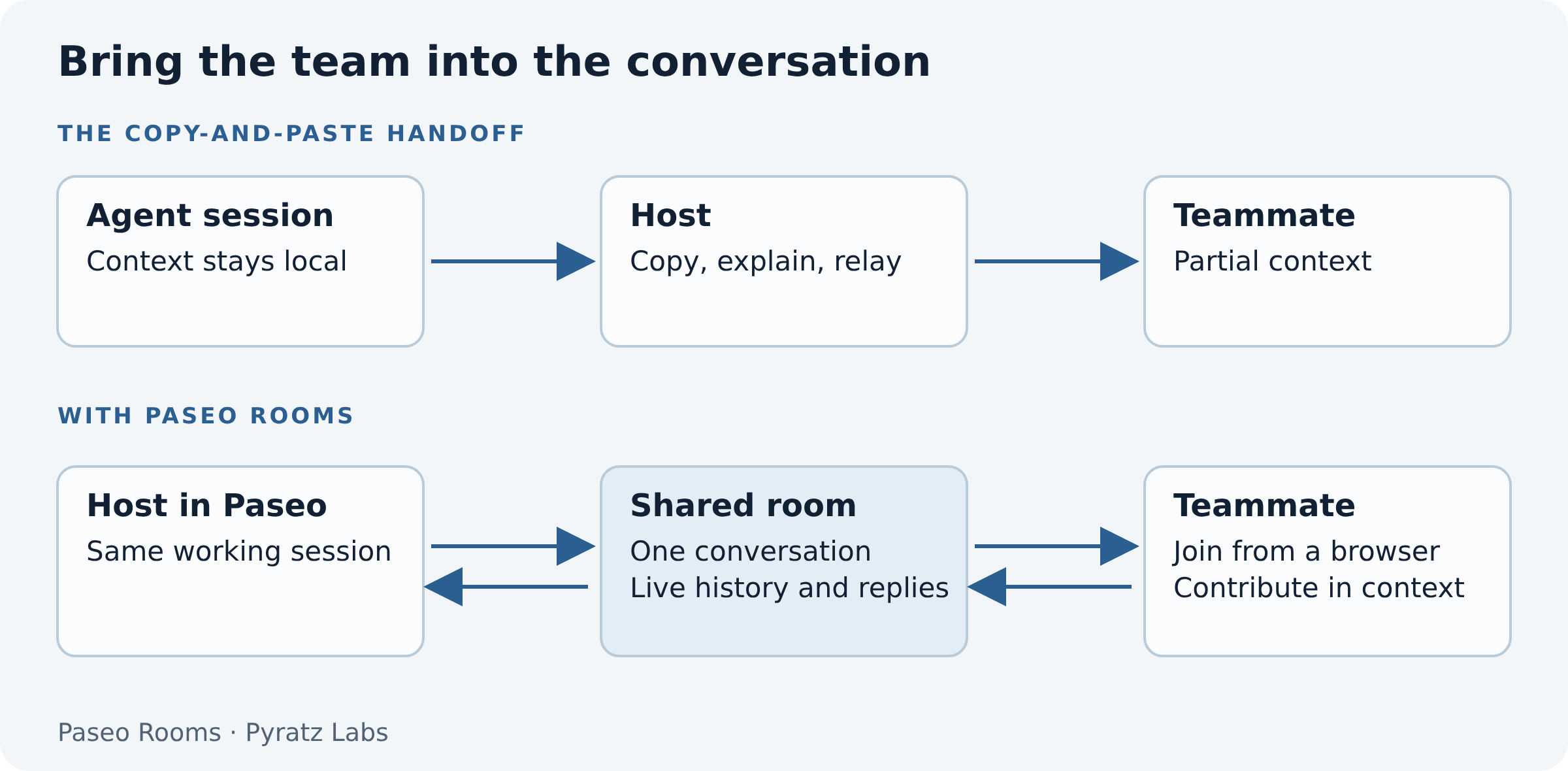
A developer is debugging with an agent, or working through an implementation plan, and needs a second opinion. They send me the problem. I take it to my own agent, work through it, and send an answer back. The developer then brings that answer into the original conversation.
We do this at Pyratz. It works, but context keeps crossing between people, tools, and agent sessions. A useful clarification can take several trips.
In the office, I can walk over to the developer's laptop and join the discussion. Remotely, we share a screen. That helps, but it also occupies their working environment. Even with two screens, they cannot always move on to something else while I investigate.
We wanted a way to join the conversation directly and let the developer keep working. That became Paseo Rooms.
A room around the work already in progress
The developer opens Share session in Paseo and creates a link. A teammate opens it in a browser, chooses a name, and joins the existing agent conversation. They can read its history, follow live replies, send a message or screenshot, and answer supported questions and plan approvals.
This is useful beyond the engineering team. We can invite a client while shaping a plan, so they can answer business questions where those questions arise. “What should happen when a customer cancels?” is easier to resolve with the person who knows the business participating in the discussion. The team chooses a session whose contents and agent permissions are appropriate for that collaboration.
The daemon makes the conversation programmable
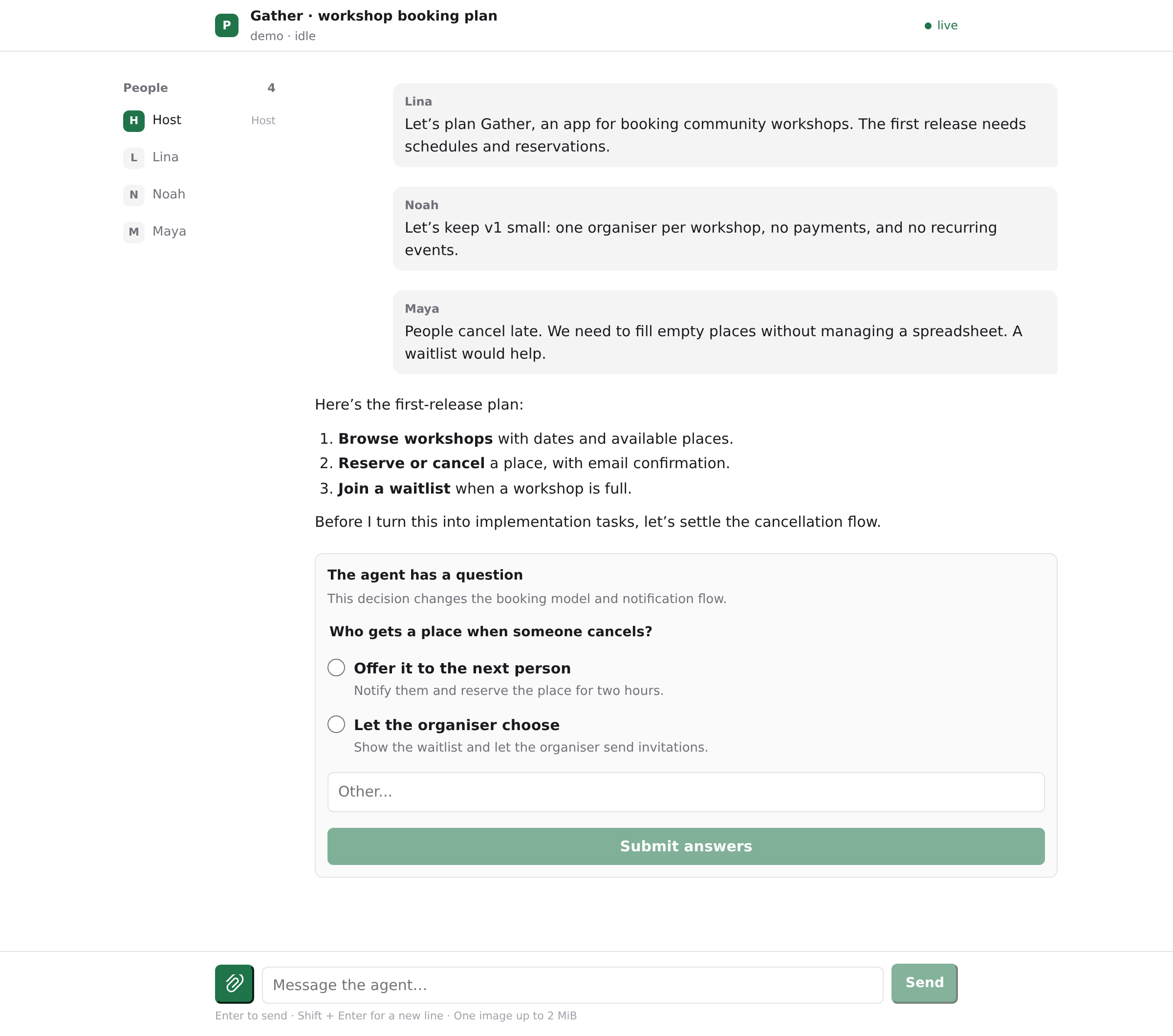
Paseo runs a daemon: a background service on the machine where the coding agents work. Its desktop, web and mobile interfaces are clients of that service. Closing a view does not, by itself, end the agent's session. The daemon manages the underlying coding harnesses—the agent programs, such as Claude Code or Codex, that work with your files and tools.
Each harness has its own protocol and way of reporting progress or asking for input. Paseo's provider adapters turn those into a common model of agents, timelines, events and pending requests. A tool call can be a typed event. A supported question can carry its text, choices and a request ID. An integration can work with that structured data rather than trying to recognise a question in a terminal screenshot.
That was the foundation we needed. Paseo's plugin system puts Share session beside the session we want to discuss. Our host-side runtime then uses the TypeScript SDK to fetch history, subscribe to live events, send contributions and respond to supported pending requests. The daemon handles the differences between the underlying harnesses; Rooms builds the collaboration layer over that shared interface.
Paseo is a concrete example of the argument I made in Extensible Software in the Agentic Age: coding agents make software with good extension points more valuable, because teams can adapt it to their own work. Rooms puts that idea into practice. We could turn a recurring problem in our team into a sharing workflow inside the tool we already used, building on the interfaces Paseo made available.
Read my earlier article: Extensible Software in the Agentic Age →
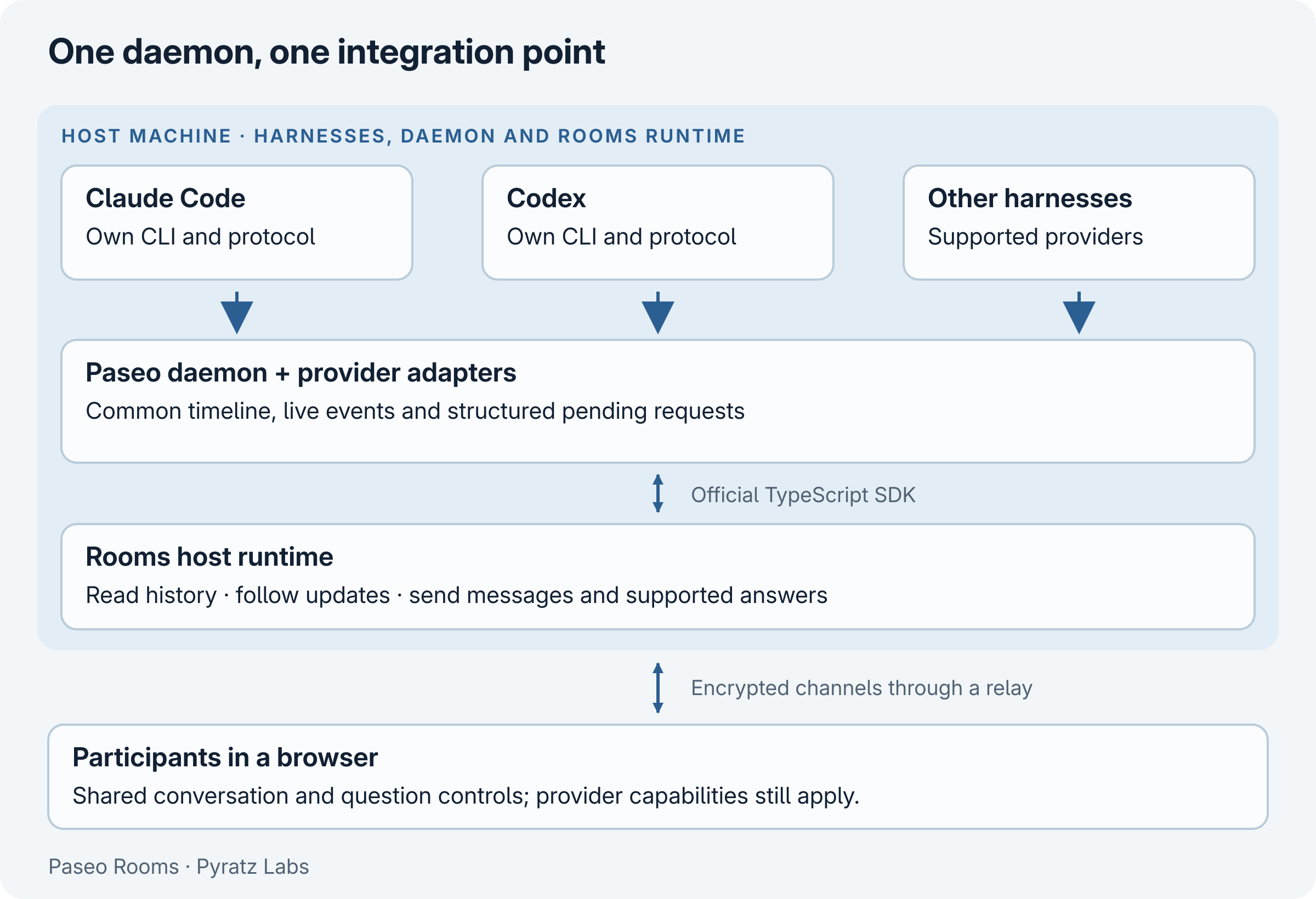
The question in the Gather example is more than a line of chat. Rooms receives a structured request, renders the supported choices, and sends the selected answer back against that request. Before answering, the host runtime checks that the request is still pending and that the response is allowed. This keeps a delayed browser click from blindly acting on stale state.
A common API does not make every harness identical. Rooms currently projects supported question requests and a specific plan-approval flow into browser controls; other permission requests remain with the host in Paseo. The runtime keeps daemon credentials on the host and limits browser operations to the selected room. The architecture documentation describes that boundary.
Encryption from the browser to the host
Sharing a conversation raises an immediate question: who can read it on the way?
The host machine opens an outbound connection to a public relay, and participants connect to that relay from their browsers. This lets them reach a laptop without opening a public port on it. HTTPS and secure WebSockets protect those network connections, but their TLS protection ends at the relay. Rooms adds encryption whose endpoints are the participant's browser and the host-side Rooms runtime. The relay forwards encrypted records between them.
We use the encrypted-channel implementation published by Paseo in @getpaseo/relay/e2ee. The connection works in three steps:
1. The invitation identifies the expected host. A new room gets a public/private keypair and a random invitation secret. The private key stays on the host. The public key and invitation secret travel in the URL fragment, the part after #. Browsers do not include that fragment in ordinary HTTP requests; the room client reads it locally and removes it from the address bar.
2. The browser and host establish a channel key. The browser creates a fresh keypair for its connection. Using its private key and the host public key from the invitation, it derives a shared encryption key. The host derives the same key using its own private key and the browser's public key. The private keys and shared key never need to cross the network. Paseo's implementation uses Curve25519 key agreement and XSalsa20-Poly1305 authenticated encryption, with a fresh random value, or nonce, for each encrypted record. Tampered records fail authentication.
3. The host checks the invitation inside that channel. Establishing encryption alone does not grant room access. The browser sends the invitation secret through the encrypted channel; the host checks it before releasing the conversation. Receiving a valid encrypted welcome also proves to the browser that it reached a holder of the expected host private key.
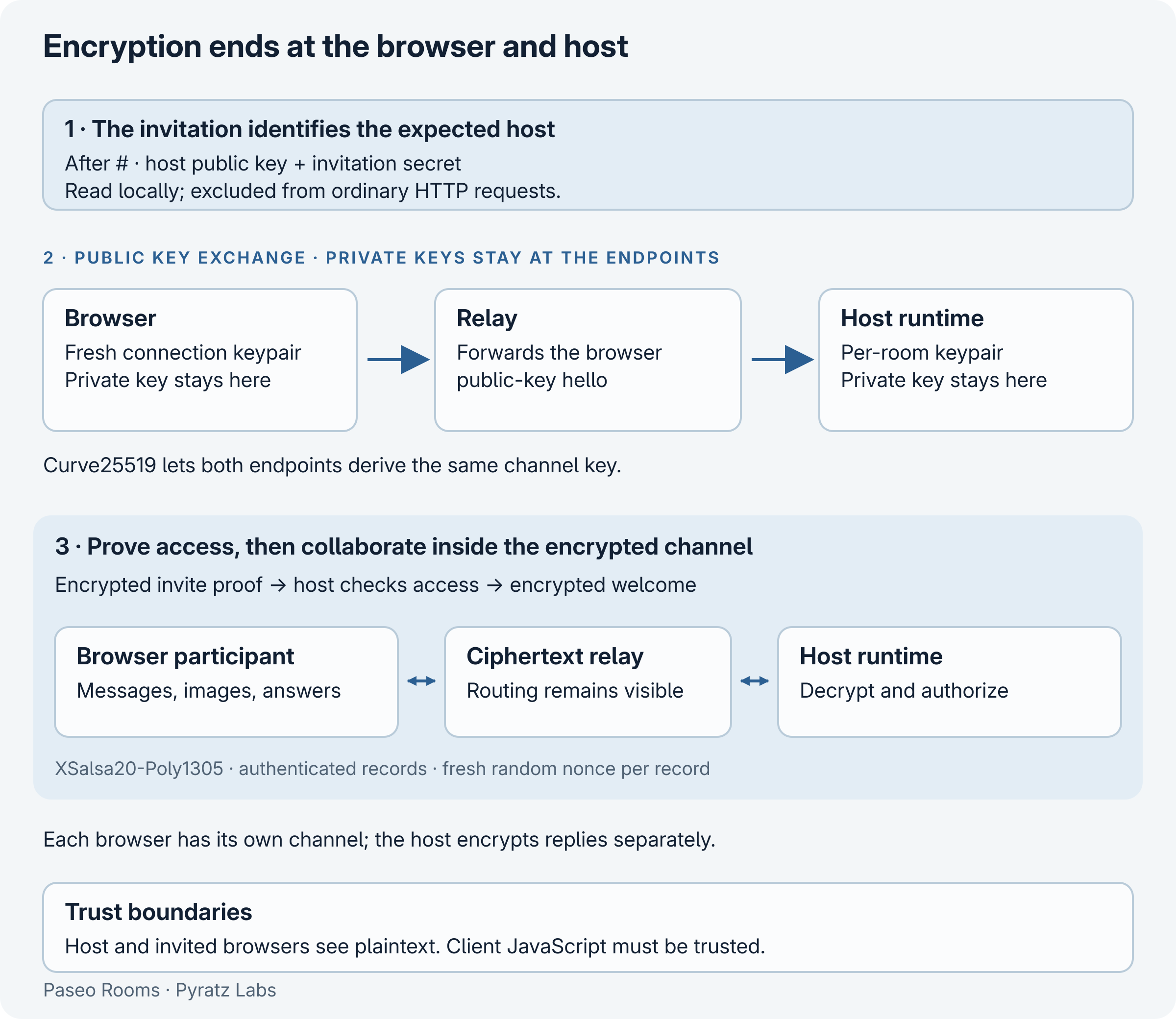
Each participant repeats this process and gets a separate channel to the host. When an agent reply arrives, the host encrypts it separately for each participant. There is no shared room-wide encryption key that would let one participant manufacture updates authenticated as coming from the host. Rooms also checks session identifiers, sequence numbers and message IDs to reject replayed or out-of-order application records; encryption alone would not provide that ordering.
The relay can still see connection information, room routes, traffic sizes and timing. It can interrupt delivery. The host sees the plaintext, and contributions sent to the agent are processed under that agent provider's own policies. These are the boundaries of the encryption, not additional guarantees about the model service.
Trust also includes the code in the browser
The JavaScript that performs encryption necessarily handles the invitation and plaintext. Someone who can replace that code could capture messages before they are encrypted. Our default client is delivered separately on GitHub Pages, so controlling the relay alone does not give control over that first page load. Users still have to trust the client deployment and its administrators. The relay-hosted client you can use on our product domain combines those responsibilities under one operator.
A team can self-host the relay and frontend under its own domain, or deliver the frontend from a separate static host it controls. That lets it choose who operates both routing and code delivery. It still needs to trust its host machines and the people it invites.
self-host the relay and frontend →
The full invitation is a bearer capability: anyone who has it can join while it is active. A chosen display name does not verify identity. Participants can also influence the agent's use of its permitted tools. Finally, this channel design does not provide forward secrecy against later compromise of the host's room private key: someone with that key and a recorded exchange could decrypt it. Per-room, in-memory keys limit their lifetime; revocation or host-process shutdown ends the room. The security documentation covers these trade-offs in detail.
How a screenshot reaches the agent and the room
A screenshot is often the missing piece in a debugging discussion. In Rooms, a participant can attach a PNG, JPEG or WebP image, up to 2 MiB, alongside a message.
The browser checks the file and uploads it in acknowledged 24 KiB chunks inside its encrypted channel. The host reconstructs the bytes, validates the format and dimensions, and keeps the attachment in bounded memory owned by that room. Splitting the upload into small records lets it report progress and acknowledge each chunk without relying on one oversized message.
When the participant sends, the host submits the message and image bytes through Paseo's SDK to the selected agent. It assigns a message ID and uses that ID to associate the attachment with the corresponding timeline entry. Other participants receive the image's room-local metadata and fetch the bytes from the host through their own encrypted channels when the preview is needed. There is no public image URL and no browser endpoint for downloading arbitrary files from the host machine.
The upload and the agent submission are separate stages. If a disconnect leaves delivery uncertain, Rooms can check the submission's receipt rather than immediately submitting the same image again. An accepted receipt means the SDK accepted the submission; it does not mean the model has finished interpreting it. Whether the agent can use an image also depends on the selected harness and model.
This support is for images sent through Rooms. Images attached directly in Paseo's own composer are not automatically imported into the room. The room's copy disappears when the room is revoked or its host process ends; that does not erase copies already downloaded by participants or submitted to the agent provider. The image-sharing guide explains the limits and delivery states.
Next: agents as participants?
We tried a small experiment: an agent opened a room through a second browser client and sent a message back into its own session. The message arrived, and the agent replied. We stopped after one exchange.
That gives us a starting point for testing whether distinct agents can exchange findings or challenge a plan in a room, with people following the discussion.
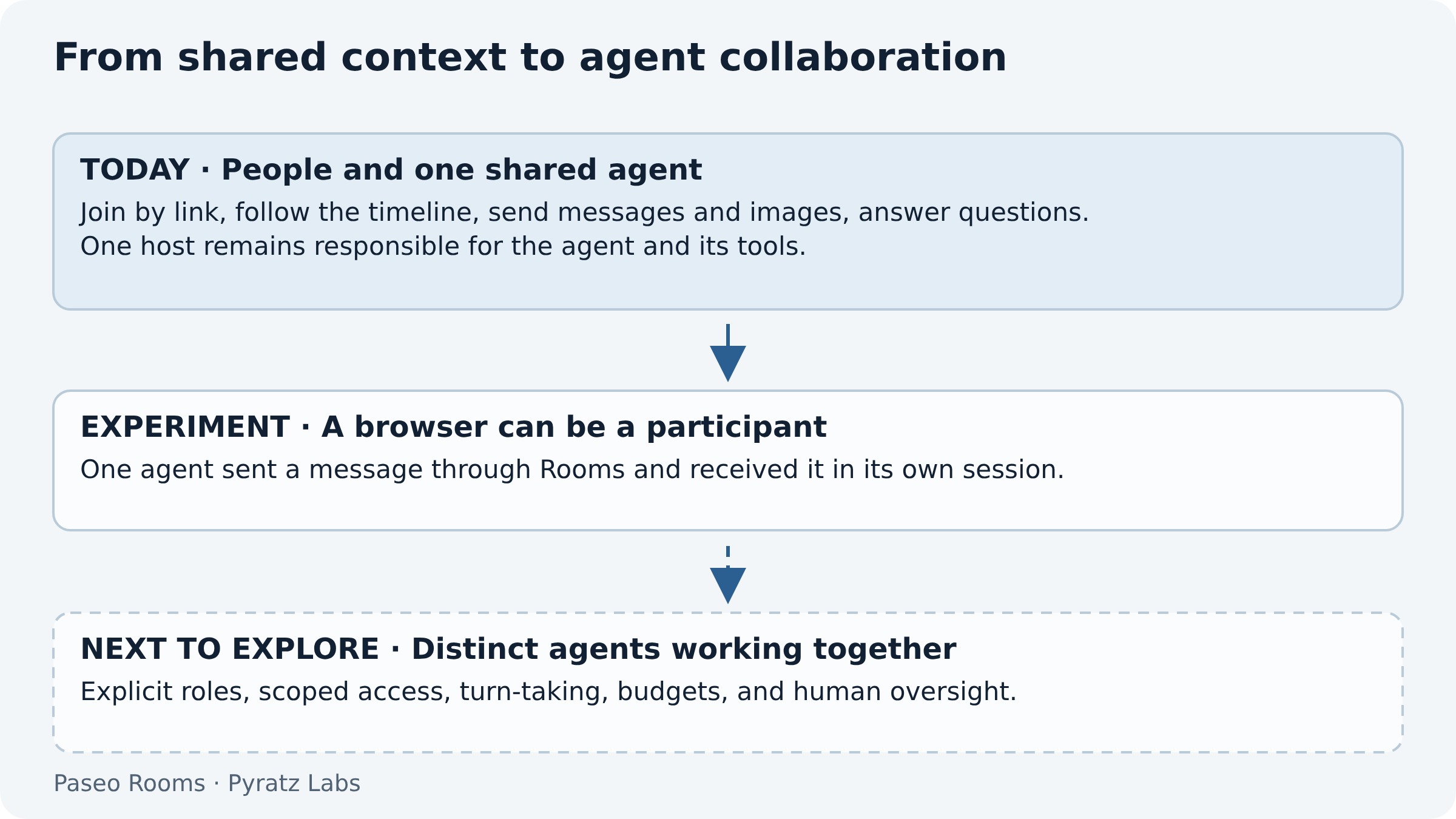
Those experiments need explicit roles, bounded turns, clear authority, and stopping conditions. A reply loop is easy to create; a useful collaboration needs more structure.
Try it with your team
We'd love you to test Paseo Rooms on a real planning or debugging session. Install the plugin, create a room, and invite a teammate or client who can help answer the next question. Participants only need the complete invitation link and a browser.
Start with a session you are comfortable sharing, check the agent's tool permissions, and revoke the link when you are done. Tell us where it helped or what got in the way by opening an issue on GitHub.
Pyratz2036 — Harnessing the power of intelligence responsibly
An investment thesis for the intelligence age: back the technologies that create abundance, the scarce resources they depend on and the regulated institutions that enable their deployment, while preserving ownership, choice and human agency.
The Software Factory
Agentic coding is changing the unit of software production: the developer increasingly designs, supervises, and improves a factory of connected build, audit, deployment, and operating systems.
Extensible Software in the Agentic Age
Coding agents make extensible software more valuable: more users can now turn small, personal workflow frictions into working tools.